|
What's new: Invigoration 2.3.2
|
 |
 |
Released 2026-09-25
|
|
|
|
StarCraft II clans and groups
- Clans & Groups, next to +: every clan and group your character is in, with your rank, the member count and its description. Press + on one to list its members by name and rank; members who come online, join a game or change rank update as it happens.
- Clan chat opens as a channel tab, as it does in the game; Open Chat does the same for a group.
- Names show as StarCraft II shows them:
<TAG> Name, with the clan tag a little smaller and no #123 code. In the Full user list, each person's BattleTag sits underneath.
StarCraft: Remastered
- Stats:
/stats Name, or right-click someone and choose Stats. You get wins and losses (overall, ranked and classic), games played, play time, APM and when the character was made.
- Check if Online (right-click): someone listed in the channel who isn't really logged on (a login stuck by a server reset) is hidden from the user list. Typing
/whois does the same.
- The user list's right-click menu works again: right-clicking a person selects them first.
Chat
- Message length limits, with a counter in the send box: 255 characters for StarCraft II, 223 for classic Battle.net and StarCraft: Remastered. Longer text is cut at the limit.
- StarCraft II doesn't send unknown
/commands as chat any more. Start a line with // to send one that begins with /.
- A new channel tab starts with "Entered channel.", instead of a blank log.
Proxies
- SOCKS4 (and SOCKS4a) alongside SOCKS5 and HTTP.
- Paste a whole proxy address:
socks5://user:pass@host:port, http://..., user:pass@host:port, user:pass:host:port or host:port:user:pass. It fills in the fields and says what it read.
Fixes
- A StarCraft II message longer than the game allows no longer closes Invigoration.
- Icon Set on the user list's right-click menu opens its list again (classic bots and SC:R).
- If Invigoration ever does crash, it writes a crash log to the
Logs folder in its settings, naming the cause.
- The new-version notice has a Don't check for updates button.
Downloads
macOS builds are signed and notarized. osx-arm64 is for Apple Silicon, osx-x64 for Intel.
🤖 Generated with Claude Code Downloads
|
|
|
|
( Release page )
|
|
|
|
News about Invigoration
|
|
|
1 post
|
|
|
|
|
|
|
|
( All news )
|
|
|
|
Invigoration 2.3.1
|
|
|
Released 2026-09-24
|
|
|
|
Battle.net friends, from StarCraft: Remastered
- Whisper a friend by their BattleTag and it goes through Battle.net, reaching them in any game, the Battle.net app or on mobile. Use the Friends tab,
/w Name#1234, or reply in the Whispers tab. Their replies land in the Whispers tab under their BattleTag.
- Add friends: type a BattleTag into the box at the top of the Friends tab, or right-click someone in the SC:R user list and choose Add Friend. The list updates as soon as they accept.
- Friend requests you receive show at the top of the Friends tab with Accept and Decline, and a line in chat tells you one arrived.
- Remove a friend: right-click them on the Friends tab, then Remove Friend... and confirm.
- Right-click someone in the SC:R user list for Whisper, Add Friend and Copy BattleTag.
- The Friends tab's right-click popup has Open in Whispers, and hides the classic-only Clan Rank, Squelch and Profile Info for Battle.net friends.
StarCraft II
- Whispering a friend by the name the Friends tab shows now addresses them directly, without needing their StarCraft II character's name.
Fixes
- StarCraft: Remastered reconnects much faster. When Battle.net holds on to the last session, Invigoration now tries again every 10 seconds instead of waiting up to a minute, and it signs out properly when it disconnects.
- Whisper threads no longer split by capitalization (
someone and Someone are one thread).
- The "no character on this gateway" message now points to New character in the bot's settings.
Downloads
macOS builds are signed and notarized. osx-arm64 is for Apple Silicon, osx-x64 for Intel.
🤖 Generated with Claude Code Downloads
|
|
|
|
( Release page )
|
|
|
|
Invigoration 2.3.0
|
|
|
Released 2026-09-24
|
|
|
|
StarCraft: Remastered, for real
Until now a StarCraft: Remastered bot quietly signed in to StarCraft II chat, because the library underneath had no real SC:R support. Invigoration now connects to SC:R itself.
- Pick your character and gateway in the bot's settings: Sign In & Load Characters lists every character on the account with its gateway (U.S. West, U.S. East, Europe, Korea, Asia). Characters belong to a gateway, so to play on a new one, create a character there once in StarCraft: Remastered.
- One channel at a time, like classic Battle.net: no channel tabs, and
/join (or /channel) moves you. The bot rejoins the channel you were last in.
- Everyone's game icon: StarCraft: Brood War, Warcraft II, Diablo and Diablo II players each show their own game.
- Chat commands like
/whois, /kick, /ban and /designate go to the server as commands.
- Your Battle.net friends list, with the game each friend is in.
StarCraft II, rebuilt
StarCraft II now runs on Invigoration's own connection instead of the Stimpak library.
- Profile portraits in the user list. The first time a StarCraft II bot connects, Invigoration offers to download them (about 21 MB, once). They're Blizzard's art, so they don't ship with Invigoration: they come from the open-source Superiority project on GitHub and are kept in your settings folder. Portraits you've seen are remembered, so they show straight away next time.
- Presence dots for away, busy and in a game, on the corner of each portrait.
- Right-click the user list for Compact (small portraits) or Full (larger portraits, with each person's BattleTag and status underneath).
- Right-click the chat for Pictures in Chat: Off, Compact, or Full (the speaker's portrait beside their name, with the message wrapping next to it).
- Friends list with BattleTags and the game each friend is in (StarCraft II, SC:R, Diablo IV, the Battle.net mobile app...).
Both games
- StarCraft II and StarCraft: Remastered can be connected at the same time on one Battle.net profile.
- Signing in works on macOS: the Battle.net sign-in window finishes properly, and paste works in it.
- Friends tab for these games looks like the Battle.net app: the game's icon, the name, and what they're doing underneath. Offline shows friends who are offline (hidden by default), and Real names shows friends who share their real name by it instead of their BattleTag.
- A name's
#1234 code is shown in dark gray, so it's there without shouting.
After updating, you'll be asked to sign in to Battle.net once more: the new connection keeps its own saved sign-in.
Classic Battle.net
- Right-click the user list → Ladder Icons turns ladder badges (StarCraft stars, Warcraft II axes, Warcraft III tiers, Diablo dots) off, so everyone shows their plain game logo. Saved per bot.
- Offline on the Friends tab works here too.
Thanks
To ncarrillo, whose Superiority and sc1-research projects (MIT) mapped much of this, including StarCraft II presence and the portrait catalog; and to novares.
If the new connection gives you trouble, starting Invigoration with the environment variable INVIGORATION_STIMPAK=1 goes back to the previous one.
Downloads
macOS builds are signed and notarized, so Gatekeeper shows no warning. osx-arm64 is for Apple Silicon, osx-x64 for Intel.
🤖 Generated with Claude Code Downloads
|
|
|
|
( Release page )
|
|
|
|
Invigoration 2.2.2
|
|
|
Released 2026-09-23
|
|
|
|
Hotline: pick your name and icon without leaving the server
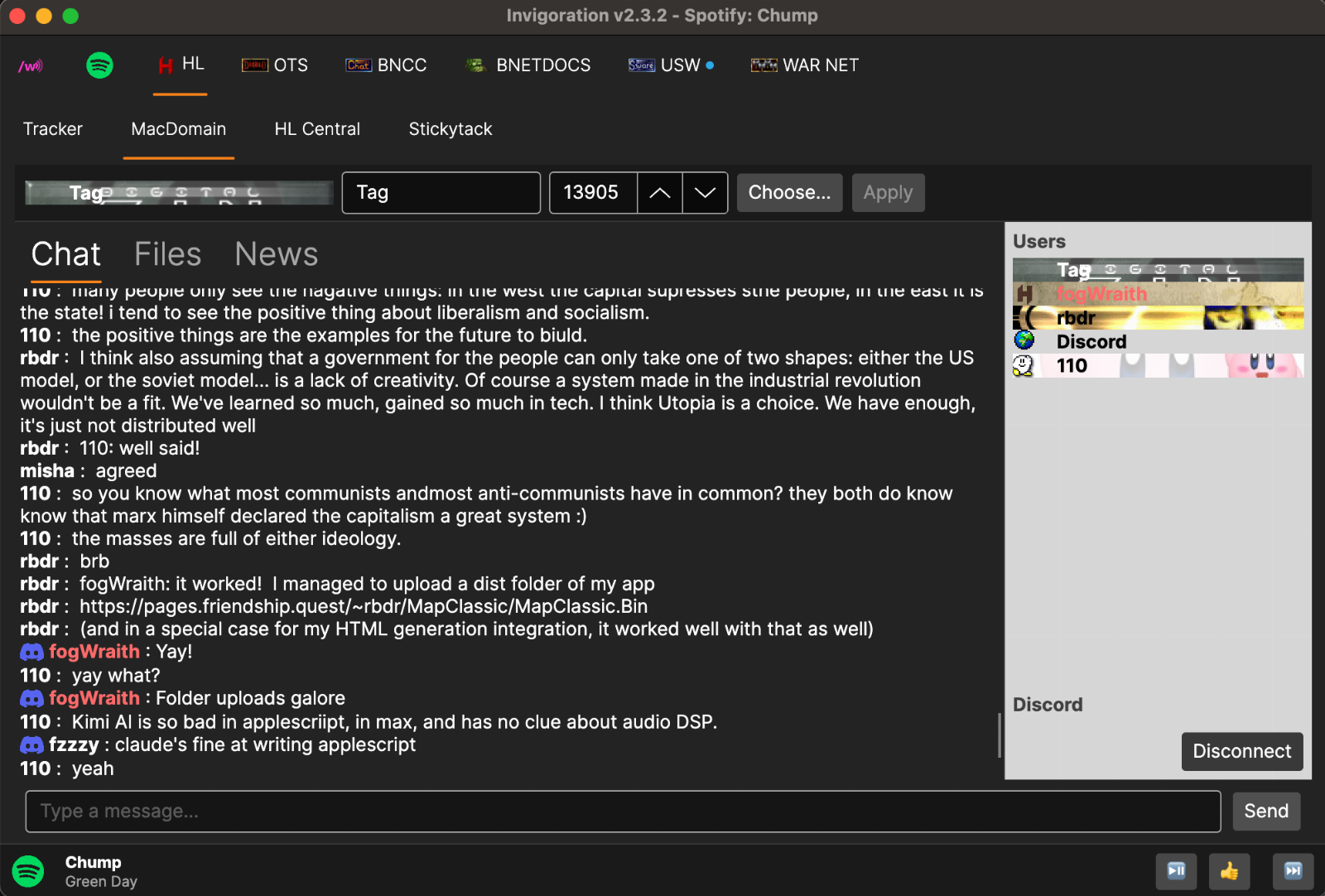
Along the top of every Hotline server tab there's now a strip for changing who you are there.
- Name and icon, then Apply. Type a new name, pick an icon number or click Choose..., and Apply sends it to the server straight away. A session opened from a saved server saves them to that server's profile too, so you come back as the same person.
- A live preview shows your name over your icon exactly as the user list will.
- Spaces at the start of a name are kept. That's how people line a name up with the art on their icon.
- Choose... opens every icon in the hlwiki.com archive (about 6,500). Search by number, or by what's on an icon: the words on it, what it shows, or its colors ("flag", "red eye", "starcraft", "dragon"). Hover an icon to see its tags. Icons tagged NSFW stay hidden unless you tick Show NSFW. Download All saves the whole archive in one go, so scrolling is instant afterwards.
Hotline user lists that are easier to read
- Names change color to suit their icon: white over dark icons, black over light ones, for everyone in the list. Admins still show in your admin color.
- Names are bold, and they start just past the emblem most icons carry at the left edge.
- The server-name bar above Chat/Files/News is gone (the tab already says it), and Disconnect now sits under the user list.
Right-click a tab
- A bot tab: Connect or Disconnect.
- A Hotline server tab: Connect, Disconnect, Reconnect, or Close. Disconnect here keeps the tab and its chat, so you can connect again later.
- A group of bots, or the Hotline tab: Connect All, Disconnect All, or Reconnect All. Bots in a group connect two seconds apart, so the server doesn't see a burst of logins.
- Music: Start or Stop.
The menu names the tab it belongs to at the top, and a group says so ("Group: ...").
Downloads
macOS builds are signed and notarized, so Gatekeeper shows no warning. osx-arm64 is for Apple Silicon, osx-x64 for Intel.
🤖 Generated with Claude Code Downloads
|
|
|
|
( Release page )
|
|
|
|
Invigoration 2.2.0
|
|
|
Released 2026-09-18
|
|
|
|
StarCraft II: stays signed in
StarCraft II bots losing their Battle.net login is fixed at the root. After any drop, the reconnect never noticed it had worked, so it signed in to Battle.net again every 20 seconds, forever, even once the bot was back in chat. Every sign-in replaces the saved one, and the overlapping attempts deleted each other's. That is why the sign-in never stuck.
- Reconnecting ends when the bot is back in chat. A lost session closes its channel tabs, says so, and reconnects once, reusing the same connection.
- One bot per Battle.net login at a time. This covers every bot in the app and every other copy of Invigoration running. A second bot on the same login is refused with a message saying who has it, instead of the two quietly deleting each other's saved sign-in. Give each bot its own Battle.net profile to run them side by side.
- No endless tug-of-war. If something else keeps taking the account's chat session (another bot, another copy of the app, or the game itself), auto-reconnect stops after three quick takeovers.
- The sign-in window names the bot it's for and closes when that bot disconnects. It also remembers Battle.net's web session between sign-ins.
- The log says how old the saved sign-in is at each connect, and when Battle.net stops accepting it.
Bot menu
Everything for the selected bot now lives in one place: Connect, Disconnect, Edit Settings, Appearance, Normalize Password, Remove (which now asks first), Add Bot, Debug Logging, and a three-way choice for joins and leaves (show all, hide spam, hide all), saved per bot.
The status bar across the top of every bot tab is gone. Under the user list there's a Connect button while the bot is disconnected ("Reconnect Now" while it's waiting to retry). Otherwise it shows a dot and a word: green for Connected, amber for Connecting or Reconnecting. Disconnect also stops a connect still under way and a reconnect countdown.
Hotline
- Manage files on the server: rename, delete (it asks first and names what will go), and create folders.
- Folder uploads, the mirror of folder downloads.
- Server banners, shown as the first line of chat.
- Profile icons can be set per server, with a live preview. Before, saved servers were stuck on the generic icon.
- File actions are always offered, and the server decides. Drop boxes accept uploads from accounts without general upload rights, which the old gating hid.
Looks
- A new app icon: the flag on wood planks, so macOS 26 no longer shrinks it onto a white square.
- Warcraft III theme: real oak grain on the frame, darker plates for the name sign and Send button, and a new optional Lettering color in Manage Themes for that text.
- On macOS, the Music Player, Music Bar and update-notice toggles under Customize were greyed out. They work now.
Downloads
macOS builds are signed and notarized, so Gatekeeper shows no warning. osx-arm64 is for Apple Silicon, osx-x64 for Intel.
🤖 Generated with Claude Code Downloads
|
|
|
|
( Release page )
|
|
|
|
Invigoration 2.1.0
|
|
|
Released 2026-09-16
|
|
|
|
Out of beta. The bunny that opens every chat window has been saying "Beta" since the VB6 days — he now says STABLE.
Hotline
Most of this release is Hotline, which went from chat-only to a real client.
Files. Browse the server's folders, download files and whole folders, and upload. Double-click a row to open a folder or download a file; right-click for the same actions. A download writes to a temporary name and renames on success, so a failed transfer can't leave a half-file that looks complete.
News. Both kinds. The threaded category tree, and — more importantly for the classic servers still running — the original flat news document, which is where their real news actually lives. Read it, post to it, and see other people's posts arrive live. Post articles and replies in threaded categories too.
Private messages. Right-click anyone in the users list to start one. Threads land in the Whispers tab alongside Battle.net whispers, and replies go back out as Hotline private messages. Incoming ones previously arrived as anonymous lines in the chat log with no sender and no way to answer.
Secure login (HOPE). Optional, per server: the password is sent as a MAC over a server-issued challenge instead of the classic bitwise-inverted form that anyone watching the connection can read. Falls back automatically on a server that doesn't support it.
Reconnecting. A dropped session comes back on its own — every 30 seconds by default, configurable, with a give-up limit. Never after you disconnect yourself, and never after the server refuses the login.
Modern tracker protocol. Version 3 is offered and falls back cleanly, so trackers that support it can list IPv6 and hostname servers and do the searching server-side.
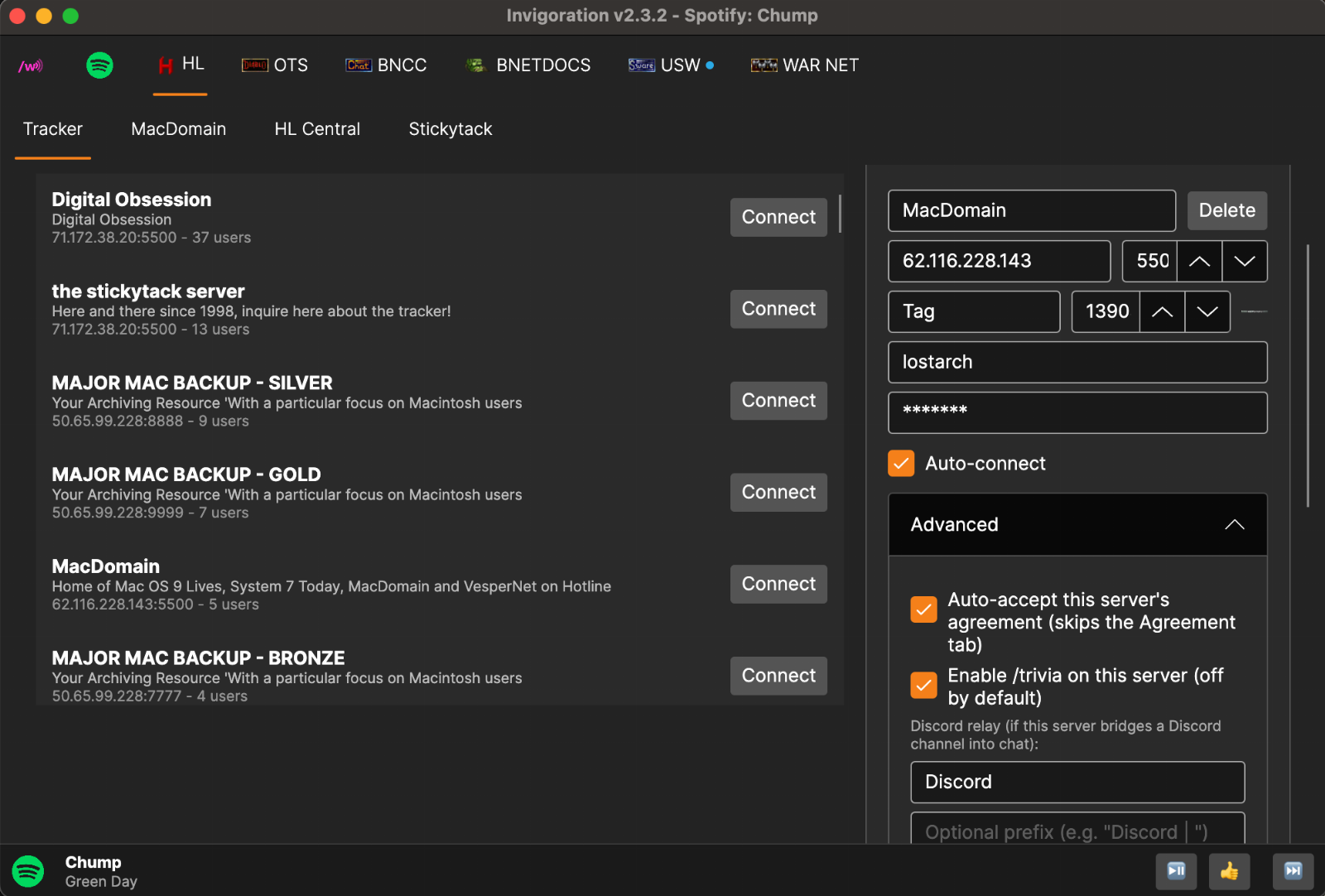
Starts with two servers — MacDomain and HL Central — so a new Hotline tab isn't an empty box. Neither auto-connects, neither carries credentials, and the nickname is "Guest".
Several protocol layouts were wrong and are now fixed against what real servers actually send: file listings came back empty, account privileges were misread (a guest was told they couldn't browse files), and news categories and articles were misparsed. Each is now pinned by tests built from bytes captured off a live server.
Elsewhere
- Chat / Telnet is back in the game list, with the handshake bug that made it "unreliable" actually fixed.
- CD keys can be pasted with the dashes people actually type.
- A quiet update notice — one dismissible line when a newer version exists, linking to this page. Never a dialog, never an installer, and it can be turned off entirely under Customize.
- Tab grouping moved back into the bot's own settings, where people look for it.
- Fixed a race that could corrupt the clan roster, and duplicate Discord bridges on reconnect.
Downloads
macOS builds are signed and notarized — no Gatekeeper warning. osx-arm64 for Apple Silicon, osx-x64 for Intel. Downloads
|
|
|
|
( Release page )
|
|
|
|
Invigoration 2.0.8b
|
|
|
Released 2026-09-16
|
|
|
|
Music, a connection type that came back, and faster reconnects.
Music player (Spotify)
A Music tab that controls Spotify through its official Web API — search, play, queue, skip, and an optional playback bar along the bottom of the window so you can skip a track without leaving the chat tab. The point: whisper your bot from inside a game to skip a song.
Invigoration asks once whether you use Spotify Premium, and hides the tab entirely if you don't. Playback happens in the Spotify app or a signed-in browser — Invigoration drives it rather than playing audio itself. The old YouTube Music view is gone; it never worked well.
Chat / Telnet is back
Available again in the game list as "Chat / Telnet (no game)" — the plain-text connection some private servers run alongside the binary protocol. No CD key, no BNLS, no version check: just a username and password.
It was removed in August as unreliable. Probing a live server found the real reasons, and neither was the protocol: the two handshake bytes were being sent as two separate writes (which the server resets on, every time), and a server that sends no login prompt at all left the bot waiting forever. Both fixed.
It's also the fastest way back onto a private server after a drop — a socket and two lines, with no handshake to repeat.
Reconnecting
- Rapid reconnect for private servers: the first attempt goes out the instant the connection drops, and each attempt skips BNLS by reusing this session's login answers — back on in about half the time. Made for holding a name or channel ops. Never used on official Battle.net.
- Configurable attempts: set the seconds between tries and how many to make before giving up (0 keeps trying). Every 45 seconds up to 10 attempts for a server that takes a while; every 1 second up to 45 for a race back on.
Logging in
Passwords are now hashed locally instead of being sent to BNLS in plain text. A password is tried as typed, then in the casing the original game client used, so older accounts still work. After Battle.net refuses a login — wrong password, closed account, bad CD key — auto-reconnect stands down instead of retrying its way into a lockout.
Settings
Bot settings now read top to bottom: Game, then Login, then Server, with everything else folded away below. Theme, chat colors and icons moved to Customize → Bot Appearance.
Fixes
- Fixed a race that could corrupt the clan roster when it was read while changing.
- Fixed duplicate Discord bridges being started on every reconnect.
Downloads
macOS builds are signed and notarized — no Gatekeeper warning. Pick osx-arm64 for Apple Silicon, osx-x64 for Intel. Downloads
|
|
|
|
( Release page )
|
|
|
|
Invigoration v2.0.7b
|
|
|
Released 2026-09-14
|
|
|
|
Invigoration v2.0.7b — Themes, the Diablo II lobby, and a proper Discord relay
A big one: every bot can now wear its own theme, and the Diablo II theme brings back D2's lobby — everyone in the channel standing along the bottom of the chat, with real D2 characters drawn in the gear they're actually wearing. This is the first step toward a proper avatar system for every game.
Themes
- Per-bot themes, picked in each bot's settings: Default, Diablo II, StarCraft, Warcraft II (gritty) and Warcraft III (dark wood with dark metal accents)
- New Manage Themes window (Customize menu): duplicate a built-in theme and adjust its colours and design
- Diablo II theme: ornate frame that wraps the send bar (never over chat text), with the chat gem beside it
Diablo II lobby
- The user list becomes D2's lobby strip: animated Battle.net chat avatars (the Moderator with his hammer, Blizzard Rep, StarCraft marine, the hooded Unknown...) standing on grass
- Diablo II realm characters drawn as themselves — in their own armour, weapons and colours, idling like the character-select screen
- Hover a D2 character to see what they're wearing ("Shako, Dusk Shroud, Crystal Blue")
- The gear data and character art come from us.bnet.cc (offered when you pick the Diablo II theme, or Customize → Download Diablo II Gear Data): opt-in, downloaded once over BNFTP, kept for every server, and quietly updated when us.bnet.cc has something newer. Nothing is ever requested from any other server
- Writing a bot? How to use the D2 character files, with a Python example
Icons
- Real ladder badges: StarCraft / Brood War / Warcraft II wins, Warcraft III tiers (including level 6 and Tournament), and Diablo progress
- Special Guest (sunglasses) status icon
- Channel-list name colours follow classic Battle.net's rules
- Hovering a game icon shows readable stats instead of raw data
- Fixed Diablo stats showing class and progress swapped, and dark boxes behind guest and Warcraft III icons
Discord relay
- Discord users show on Battle.net as [Discord] name — with a Discord logo in other Invigoration bots
- Battle.net chat posts to Discord as the speaker, with their game's classic logo as the avatar
- Fixed messages echoing back, relaying twice, and Discord names being able to pass for Battle.net accounts
Connection & login
- Your password no longer leaves your computer on the classic login (StarCraft, Diablo, Diablo II, Warcraft II): it's hashed locally instead of being sent to the BNLS server. (Warcraft III's login still uses BNLS.)
- Passwords are tried in Battle.net's casing first (lowercase; Warcraft III uppercase). If that's refused, one fresh connection tries it exactly as typed, for accounts older bots made, and whichever works is remembered, so it logs in on the first try next time
- Auto-reconnect no longer keeps retrying after Battle.net refuses the login (wrong password, closed account, bad CD key), since repeated failed logins can lock an account out
- New Normalize Password (File menu) changes a mixed-case password to Battle.net's casing on the server
- Fixed Atlas dropping the connection: stopped a cross-bot trivia relay loop, and long chat is split to fit
- Fixed an auto-reconnect loop that disconnected a bot every reconnect-delay seconds
macOS, Linux, Windows :)
Downloads updated 2026-09-14 with the login changes above. Downloads
|
|
|
|
( Release page )
|
|
|
| |
|
Links
|
|
|
Clients
|
|
|
Servers
|
|
|
Trackers
|
|
|
Bots
|
|
|
Misc
|
|
|