|
Hotline Navigator
|
 |
 |
[ Clients ] | Mac, Windows, Linux, Android, iOS | 21 releases | HTML | 28 stars on GitHub
|
|
|
|
A modern Hotline client.
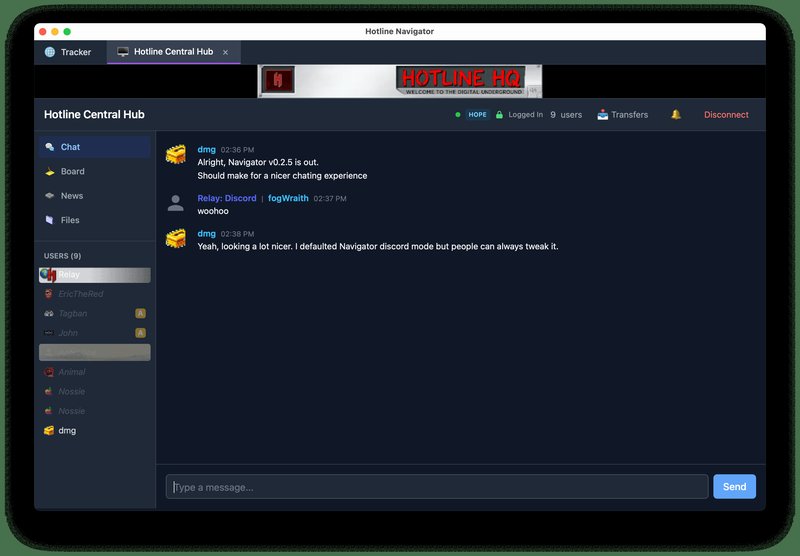
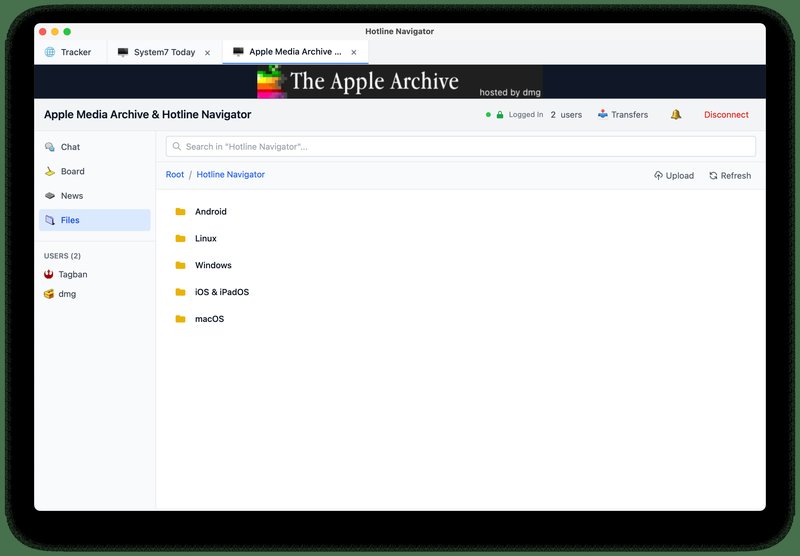
Screenshots from the project's README.
A modern, cross-platform Hotline client built with Tauri, React, and Rust. This is a spiritual port of Dustin Mierau's wonderful Hotline app, with the goal of bringing the classic Hotline protocol to as many modern platforms as possible. It provides multi-session, single window interface and a responsive design.
This port is divergent from the original Swift/macOS Hotline client and is not a direct port, rather a recreation of it in Tauri using React and Rust, the source code providing valuable information about the protocol and how to implement it. From the project's README.
Website | Source code
|
|
|
|
( All clients | Edit this page | Edit on GitHub )
|
|
|
|
What's new: v0.3.0 - Resumable Transfers, Modern Trackers, and Custom Avatars
|
|
|
Released 2026-09-05
|
|
|
|
v0.3.0
This release fills in a substantial part of Navigator’s Hotline protocol support: interrupted transfers can resume, entire folders can be transferred, modern trackers are supported, and compatible servers can display custom GIF avatars.
Text handling also gets a deeper cleanup. Navigator now negotiates UTF-8 consistently across live chat, history, news, and file names, while keeping MacRoman compatibility with classic servers. Private conversations gain media attachments, file sizes and dates are handled more accurately, and saved passwords move into encrypted storage.
New Features
- Resumable file transfers — Interrupted downloads retain partial data and can resume when the remote file still matches. Uploads support classic resume offsets and modern partial-file verification, restarting when a safe resume is unavailable.
- Folder transfers — Download folders from the file browser or use Upload Folder on desktop. Nested and empty folders are supported, with checks that keep received paths inside the destination folder.
- Modern trackers and server discovery — Trackers support v1, v2, and v3, including authenticated listings and optional certificate-validated TLS. Server bookmark information can display advertised ports, transports, and features.
- Custom GIF avatars — Set or clear an avatar on compatible servers. Avatars appear in user lists, user details, and grouped chat, with classic icons as a fallback.
- Private media attachments — Inline media support now extends to private messages and private rooms, respecting the server’s advertised media limits.
Bugfixes and Improvements
- Consistent text and history — UTF-8 is used when negotiated with the server; classic sessions use MacRoman. Live messages, history, news, and file names follow the same encoding, and line endings no longer produce duplicate newlines.
- More accurate file metadata — Extended file and folder sizes and both protocol date formats are supported. Large-file upload framing now matches the negotiated transfer format.
- Safer saved passwords — Bookmark passwords are protected in encrypted storage.
- Hardened external previews — External image fetching received additional validation and privacy protections.
- Bounded transfer memory use — Downloads stream to disk instead of buffering the entire file, and completed downloads avoid overwriting existing local files.
- Correct version from the first frame — About and Update screens use the packaged version immediately, fixing the brief flash of version 0.2.3.
Technical
- Session-wide UTF-8 negotiation covers protocol text fields, embedded names, file paths, and history; decoding no longer guesses the encoding.
- Classic upload resumes honor RFLT fork offsets. Modern upload resumes verify a partial-file SHA-256 digest before appending.
- Folder streams support nested paths and AEAD wrapping, with destination confinement and rejection of local links and special files.
- Tracker v3 handles UTF-8, IPv4, IPv6, and hostname records. Authentication denial does not silently downgrade to an older protocol.
- GIF avatar caches are bounded and scoped to the connection. Disconnects and user departures clear the relevant entries.
- Validation includes 148 Rust tests, 87 frontend tests, and a production build. The macOS installer is signed and notarized.
Current Limitations
- Retrying a failed folder download creates a new destination folder; completed files from the previous attempt remain available. Mobile folder upload is not yet supported.
- Folder streams have a 32-bit per-file length limit; larger files must be uploaded individually.
- Custom avatars are session-specific and must be set again after reconnecting. Local limits are 32 KiB, 256 × 256 pixels, 60 frames, and 15 seconds.
- Tracker v3 currently requests complete listings; server-side search and pagination are not exposed.
- Live-server interoperability testing remains ongoing, including encrypted folder transfers.
Installation
Download the universal .dmg below for macOS, open it, and drag Hotline Navigator into Applications. It supports Intel and Apple Silicon Macs running macOS Big Sur or later.
This release includes the macOS installer. Windows, Android, iOS / iPadOS, and Linux installers are not included in this release. Downloads
|
|
|
|
( Release page )
|
|
|
|
News about Hotline Navigator
|
|
|
1 post
|
|
|
|
|
|
|
|
( All news )
|
|
|
|
v0.2.9 - Colorful Names, Chat Image Uploads, More hardening against goobers
|
|
|
Released 2026-07-04
|
|
|
|
v0.2.9
This release is a bigger step forward than the last one: Navigator can now participate in Hotline inline media instead of just text, and the surrounding UX has been tightened up so it feels integrated instead of bolted on.
You can now attach and view inline images in chat on servers that support the feature, usernames can render with server-defined colors without becoming unreadable, and access changes update live instead of requiring reconnects to take effect. News and board handling also got another round of fixes, and external image rendering is now routed through a safer privacy-preserving flow instead of letting arbitrary chat content beacon your IP through the WebView.
Under the hood, this release also adds end-to-end TLS/handshake/transaction coverage and hardens media caching so malformed or tiny spam entries cannot silently turn into a memory or CPU sink.
New Features
- Inline media support — Expanding on rich chat, like before Navigator now supports Hotline inline media attachments and rendering. The new feature is On compatible servers, images can be attached directly in chat and appear inline with loading, success, and failure states instead of as invisible or ambiguous payloads.
- Colored nicknames — Usernames can now render with server/user-defined colors in chat and related UI, with legibility enforcement so colors remain readable against the current theme.
- Live access updates — Permission changes from the server now apply without needing a reconnect, so capabilities like posting inline media update in-session as access changes arrive.
Bugfixes and Improvements
- Safer external image loading — External chat images no longer rely on direct WebView fetches. They now go through an app-managed fetch path that prevents untrusted chat content from becoming an IP-disclosure / tracking-beacon channel.
- Better image preview UX — Inline external image previews can be enabled globally, but individual images can also be loaded on demand. Failed loads now fail visibly instead of silently disappearing, and 404s no longer cause jittery retry loops.
- Board and news navigation fixes — News/category handling on more complex servers is more reliable, including multi-level structures that previously misrouted or stalled when traversing nested content.
- Correct access-bit handling — Access permissions are now decoded with the correct Hotline bit ordering, fixing cases where capability checks could be interpreted incorrectly.
- Media cache hardening — The inline-media cache is now bounded by both byte size and entry count, and implausibly tiny image payloads are rejected up front. This is transparent in normal use but closes off an easy client-side memory/CPU DoS path.
- General polish around media attachments — Attachment chips, metadata display, and inline render states were refined so chat media is easier to understand at a glance.
Technical
- Hotline inline media capability bit 3 is now wired end-to-end through protocol, backend, and UI.
- External image fetching is handled in Tauri with URL validation, safer redirect handling, content-type checks, and payload size limits rather than raw WebView loads.
- End-to-end TLS, handshake, and transaction tests were added to catch protocol regressions earlier.
- Access-bit parsing now uses 64-bit-safe handling with correct MSB-first semantics per protocol expectations.
- Media cache eviction now enforces both a byte cap and an entry cap rather than scanning only against total payload size.
Installation
Download the installer for your platform from the release assets.
.dmg = macOS, .msi / .exe = Windows, .apk = Android, .ipa = iOS / iPadOS, Linux hippies can figure it out...
/edit: Linux releases will arrive soon Downloads
|
|
|
|
( Release page )
|
|
|
|
v0.2.8 - Quality of Life
|
|
|
Released 2026-04-21
|
|
|
|
v0.2.8
There's been a lot of rapid changes in Navigator's capabilities so this release UX quality-of-life series of fixes since the Discord style chat introduced a new UX paradigm which inevitable had some loose ends.
Disconnects are detected in seconds instead of minutes, chat icons no longer fall back to gray letter placeholders for emotes or for users who chatted before their info loaded, and ! / / commands now appear above the bot's response instead of below it. News browsing also works on multi-tier servers like VesperNet, where top-level entries are folders of folders.
Next release will be new feature bound.
Bugfixes and Improvements
- Optimistic Command Echo — Chat commands prefixed with
! (server bots) or / (e.g. /me, /em) now render locally the moment you hit send, so they reliably appear above the bot's broadcast response instead of below it. Pending messages display at 60% opacity until the server confirms; regular chat keeps its original wait-for-echo behavior.
- Faster disconnect detection — When a server vanishes silently (peer crash, network drop, NAT timeout), the client now notices in ~60s on macOS/Linux and ~130s on Windows, down from the OS TCP retransmit default of 15+ minutes. Auto-reconnect kicks in correspondingly faster.
- Chat icons for emote messages —
*** name action (from /me) now shows the sender's icon and username header instead of a gray letter placeholder. Multi-word usernames like dmg - dev resolve correctly via a longest-prefix match against the live user list.
- Chat icons no longer get stuck — Messages that arrived before the user list populated previously kept the gray letter placeholder forever. Icons (and admin badges) are now resolved from the live user list at render time, with the receipt-time value as a fallback for users who have since left.
- News browsing on nested servers — On servers like VesperNet where the top-level news entries are folders containing more folders, navigation no longer dead-ends with an empty article pane. The client now dispatches based on the clicked item's actual type (bundle vs. category) rather than assuming any non-root path holds articles.
Technical
- TCP
SO_KEEPALIVE configured on the control channel via socket2: idle=30s, interval=10s, retries=3 on macOS/Linux. Windows uses the OS default retry count.
- App-level keepalive failure now emits
StatusChanged(Disconnected) and clears the transport, instead of silently breaking.
- Rust chat handler extracts the sender from the
*** emote prefix when no UserName field is present.
DiscordChatRenderer accepts a live users prop and resolves iconId/isAdmin per-render via a resolveLive(msg) helper.- Optimistic insert tagged with
pending: true and optimisticKey; echo dedup matches by userName + message text within a 10s window. /me and /em are preformatted as *** name action to match the server echo. 30s safety timeout clears the pending flag if no echo arrives.
- News load effect dispatches on a tracked
newsLeafType (2 = bundle → get_news_categories; 3 = category → get_news_articles). Going back always sets leaf type to bundle, since non-leaf path segments are bundles by invariant.
- Protocol version field corrected to
u16 per Hotline spec.
Installation
Download the installer for your platform from the release assets.
.dmg = macOS, .msi/.exe = Windows, .apk = Android, .ipa = iOS/iPadOS, Linux hippies can figure it out... Downloads
|
|
|
|
( Release page )
|
|
|
|
v0.2.7 - Chat history!
|
|
|
Released 2026-04-17
|
|
|
|
v0.2.7
Server-side chat history is here! Connect to a server running the Chat History Extension and you'll see the conversation that happened before you arrived. Scroll back through it, pull to load more, just like Discord. Servers without history support are completely unaffected.
This is a pretty big upgrade and allows servers to add chat history. Anyone writing their own server can always yank Navigator and run the tauri in dev mode as there's a ton of debugging that is exposed.
Also hardened link preview fetching against SSRF, added a link preview toggle, and fixed download filename collisions.
As writing this the only server that has chat history is Apple Media Archive as it's the only hotline server I run.
New Features
- Server-Side Chat History - Servers that support the Chat History Extension (capability bit 4) now serve historical messages to Navigator. The latest 50 messages load on connect, and you can scroll back through the full archive with a pull-to-load-more gesture. Retention policy is displayed above the history (e.g., "This server keeps 30 days / 10,000 messages of chat history").
- Separate History Preferences - "Server Chat History" (on by default) and "Local Chat History" (off by default) are now independent toggles in Settings. Local recording is automatically suppressed on servers that provide server-side history.
- Link Previews Toggle - Rich link previews (title, description, image) in Discord chat mode can now be toggled independently from Discord mode.
- Apple Media Archive uses HOPE --The default bookmark for Apple Media Archive now has HOPE enabled, with automatic migration for existing users.
Improvements
- Sign-on/off messages from server history render as centered italic system text, matching live join/leave notifications in Discord mode for history.
- Sending a message while scrolled up through history snaps back to the bottom
- Elastic pull-to-load-more when scrolling to the top of chat history, with a progress indicator and spinner
- "Beginning of chat history" marker shown when the full archive has been loaded
- Download filename collisions now append numbered suffixes (
file (1).txt, file (2).txt) instead of overwriting
- Startup chat history passphrase prompt removed - local vault uses a default passphrase
Security
- SSRF Protection for Link Previews — Link preview fetches now validate target URLs before connecting. Private/internal IP ranges are blocked (RFC 1918, loopback, link-local, CGNAT, ULA IPv6). Only http/https schemes allowed. Redirects are followed manually with per-hop validation, preventing redirect-based SSRF attacks.
Technical
- New
protocol/history.rs module with packed binary entry parser, mini-TLV sub-field skipping, and 6 unit tests
CAPABILITY_CHAT_HISTORY (bit 4), TransactionType::GetChatHistory (700), and 8 new FieldType variants (0x0F01–0x0F08) added to protocol constantsget_chat_history method on HotlineClient with cursor-based pagination via pending-transaction patternChatHistoryResponse / ChatHistoryEntry Tauri command with message IDs serialized as strings to avoid JS Number precision loss on u64ServerInfo extended with chatHistorySupported, historyMaxMsgs, historyMaxDaysis_private_ip() and validate_url_target() for SSRF-safe link preview fetching with manual redirect following- Reconnect catch-up via
AFTER cursor when the tab stays alive across disconnect/reconnect cycles
Installation
Download the installer for your platform from the release assets.
.dmg = macOS, .msi/.exe = Windows, .apk = Android, .ipa = iOS/iPadOS, Linux hippies can figure it out... Downloads
|
|
|
|
( Release page )
|
|
|
|
v0.2.6 - Hotfix release
|
|
|
Released 2026-04-15
|
|
|
|
v0.2.6 Mini Release
Sometimes you don't adequately test. Inline images weren't rendering. OpenGraph previews for links in Discord mode.
- Fix CSP img-src to allow http:/https: URLs (images were blocked in compiled builds)
- Add OpenGraph link preview cards for non-image URLs in Discord chat mode
- Inline images now display by default in Discord mode
- Add fetch_link_preview Rust command for server-side OG metadata extraction
v0.2.5
Major chat UX overhaul with a new Discord-style display mode, makes things look a lot cleaner. It's the default chat mode but also allows for retro mode as well
Windows builds are now available via GitHub-hosted runners.
New Features
- Discord Chat Mode - New chat display option that groups consecutive messages by user with Hotline icons, timestamps, and batched message groups. Image URLs render as inline previews without showing the URL. Set as the default for new users, switchable to Retro (IRC-style) in Settings.
- Reconnect Button - Disconnected server tabs now show a ↺ button next to the close button for quick one-click reconnection without opening a new tab.
- Server Chat History Deduplication - Servers that replay chat history on connect (like Janus) no longer cause duplicate messages. Replayed messages are labeled "Server History" to distinguish them from live chat.
Improvements
- Chat timestamps suppressed for server history messages since the original time is unknown
- Server history messages don't play notification sounds or get re-persisted to local storage
- Chat display preferences are mode-aware, retro-specific toggles are greyed out in Discord mode
- User icons are now captured and stored with chat messages for Discord mode rendering
Technical
- New
DiscordChatRenderer component with message batching logic (breaks on sender change, system messages, or 5-minute gap)
- Windows build workflow added using GitHub-hosted
windows-latest runners
- Duplicate join/leave system messages deduplicated
- Removed 32 bit support for Android. It makes the binary bigger. It causes build issues. Android 14 was the last to support 32-bit apps and google play around 2019 started mandating 64-bit support. No one was going to make use of this binary. Even if this project's goal is to support as many OSes and wide of range of devices as possible, this can be effectively removed and absolutely 0 people on planet will notice.
Bugfixes
- Server chat replay no longer duplicates messages when reconnecting with chat history enabled
- Username prefix no longer doubled in Discord mode when server embeds sender name in message data
- User icon resolution falls back to username lookup when server sends userId 0
Installation
Download the installer for your platform from the release assets.
.dmg = macOS, .msi/.exe = Windows, .apk = Android, .ipa = iOS/iPadOS, Linux hippies can figure it out... Downloads
|
|
|
|
( Release page )
|
|
|
|
v0.2.5 - Discord style conversations
|
|
|
Released 2026-04-14
|
|
|
|
v0.2.5
Major chat UX overhaul with a new Discord-style display mode, makes things look a lot cleaner. It's the default chat mode but also allows for retro mode as well
Windows builds are now available via GitHub-hosted runners.
New Features
- Discord Chat Mode - New chat display option that groups consecutive messages by user with Hotline icons, timestamps, and batched message groups. Image URLs render as inline previews without showing the URL. Set as the default for new users, switchable to Retro (IRC-style) in Settings.
- Reconnect Button - Disconnected server tabs now show a ↺ button next to the close button for quick one-click reconnection without opening a new tab.
- Server Chat History Deduplication - Servers that replay chat history on connect (like Janus) no longer cause duplicate messages. Replayed messages are labeled "Server History" to distinguish them from live chat.
Improvements
- Chat timestamps suppressed for server history messages since the original time is unknown
- Server history messages don't play notification sounds or get re-persisted to local storage
- Chat display preferences are mode-aware, retro-specific toggles are greyed out in Discord mode
- User icons are now captured and stored with chat messages for Discord mode rendering
Technical
- New
DiscordChatRenderer component with message batching logic (breaks on sender change, system messages, or 5-minute gap)
- Windows build workflow added using GitHub-hosted
windows-latest runners
- Duplicate join/leave system messages deduplicated
- Removed 32 bit support for Android. It makes the binary bigger. It causes build issues. Android 14 was the last to support 32-bit apps and google play around 2019 started mandating 64-bit support. No one was going to make use of this binary. Even if this project's goal is to support as many OSes and wide of range of devices as possible, this can be effectively removed and absolutely 0 people on planet will notice.
Bugfixes
- Server chat replay no longer duplicates messages when reconnecting with chat history enabled
- Username prefix no longer doubled in Discord mode when server embeds sender name in message data
- User icon resolution falls back to username lookup when server sends userId 0
Installation
Download the installer for your platform from the release assets.
.dmg = macOS, .msi/.exe = Windows, .apk = Android, .ipa = iOS/iPadOS, Linux hippies can figure it out... Downloads
|
|
|
|
( Release page )
|
|
|
|
v0.2.3
|
|
|
Released 2026-04-02
|
|
|
|
v0.2.3
The Hotline community now has its own search engine. Mnemosyne is an indexing service that participating Hotline servers sync their content to message board posts, news articles, and file listings. Navigator can now search across all of them before you even connect.
The app ships with vespernet.net pre-configured as the default search instance. Existing users get a one-time prompt to opt in.
New Features
Mnemosyne Search
- Search across files, news articles, and message board posts from multiple Hotline servers all without connecting first
- Ships with vespernet.net as the default search instance
- Filter results by content type with All/Board/News/Files toggles
- Index stats shown on the search screen (servers indexed, total files, posts, articles)
- Add custom Mnemosyne instances via the Connect dialog (⌘K → "Mnemosyne (Search)" type) with a connection test button
New Default Server
- Added Hotline Central Hub (server.bigredh.com) as the first default server bookmark
Improvements
- Remote user icons from hlwiki.com now load correctly (CSP fix for
img-src). This was a goof by me adding more security.
- Search button in the Tracker header opens the search tab directly, hidden when no search engines are configured
- Mnemosyne instances appear in the bookmark list with a purple search icon and right-click context menu
Technical
- All Mnemosyne API requests are proxied through a Rust-side
mnemosyne_fetch Tauri command using reqwest, bypassing browser CORS restrictions
- Mnemosyne bookmarks persisted in localStorage, independent of server bookmarks
- Tab system extended with
mnemosyne type — deduplication, close button, magnifying glass icon
- URLs without a protocol prefix are auto-normalized to
http://
- 21 Vitest tests covering search, filters, stats, errors, and URL normalization
- README updated with full Mnemosyne documentation section
Bugfixes
- Fixed Content Security Policy blocking remote user icons from hlwiki.com, custom icons now render instead of falling back to numeric IDs
Installation
Download the installer for your platform from the release assets.
.dmg = macOS, .msi/.exe = Windows, .apk = Android, .ipa = iOS/iPadOS, Linux hippies can figure it out... Downloads
|
|
|
|
( Release page )
|
|
|
|
v0.2.2 - Vintage TLS + Auto Connect/Reconnect + better disconnect feedback
|
|
|
Released 2026-04-01
|
|
|
|
v0.2.2
So (Lemoniscate)[https://github.com/fuzzywalrus/lemoniscate/], my C re-write of Mobius (Hotline Server) for both PowerPC OS X and x86 macOS 10.11 and above now supports full end-to-end encryption. Unfortunately though, OS X 10.4/10.5 only supports TLS 1.0 which created a massive undertaking for both the client and server to support both.
So Navigator now supports TLS 1.0 (opt in). The rest of this is largely around connectivity. Previously, Navigator didn't display disconnected servers clearly. Now there's re-connect features in the prefs and the ability to create servers to auto connect to on lunahc
New Features
Legacy TLS Support (TLS 1.0/1.1)
- New "Allow Legacy TLS" toggle in Settings for connecting to servers that only support TLS 1.0 with older cipher suites (e.g. DHE-RSA-AES256-SHA)
- Uses vendored OpenSSL for full control over protocol versions and ciphers — macOS SecureTransport has removed these legacy cipher suites
- Modern TLS (1.2+) is always attempted first; legacy is only used as a fallback when enabled
- Covers both the main connection and file transfers
- Helpful error message when TLS fails suggesting the legacy TLS setting
Auto-Reconnect
- New "Auto-Reconnect" toggle in Settings with configurable options:
- Retry interval (1–999 minutes)
- Max retries (1–99)
- Sliding interval option that doubles the wait after each attempt (e.g. 3m → 6m → 12m, capped at 12 hours)
- Countdown timer shown in the disconnect modal with attempt counter
- "Retry Now" and "Cancel" buttons during reconnect
- Only triggers on unexpected server disconnects — manual disconnect (clicking Disconnect) does not auto-reconnect
Tracker Server Search (Experimental)
- After reconnect retries are exhausted, a "Search Trackers" button queries all configured trackers for the server name
- If the server is found at a different IP, shows results with an "Update & Connect" button to update the bookmark and reconnect
- Helps recover when a server changes its IP address
Connect on Launch
- New "Connect on launch" checkbox in the Edit Bookmark dialog
- Bookmarks with this enabled automatically connect when the app starts
- Multiple bookmarks connect in parallel without blocking each other
Native Menu Bar (macOS/Windows/Linux)
- Full native menu bar with Hotline Navigator, Edit, Window, and Help menus
- Hotline Navigator menu: About, Settings (⌘,), Hide/Show, Quit
- Edit menu: Undo, Redo, Cut, Copy, Paste, Select All
- Help menu: Hotline Navigator Wiki, GitHub, Report an Issue, README
- Settings menu item switches to the Tracker tab and opens Settings
Improvements
- Disconnected server tabs now show a red dot and greyed-out icon in the tab bar
- Connection status synced from ServerWindow to the tab store for real-time tab styling
- Protocol debug logging now emits to the frontend for TLS handshake, connection, HOPE probe, login, and version negotiation events
- All TLS paths (modern and legacy) now have 10-second timeouts to prevent hanging on unresponsive servers
- MacRoman encoding verified with new Rust unit tests (café → 0x8E, CJK → UTF-8 fallback)
Bugfixes
- TLS handshakes no longer hang indefinitely against servers that don't respond
Installation
Download the installer for your platform from the release assets.
.dmg = macOS, .msi/.exe = Windows, .apk = Android, .ipa = iOS/iPadOS, Linux hippies can figure it out... Downloads
|
|
|
|
( Release page )
|
|
|
|
v0.2.1 - Hope Support
|
|
|
Released 2026-03-28
|
|
|
|
v0.2.1
This release adds HOPE (Hotline One-time Password Extension) secure login support and maintains compatibility with original. This is more future tensed as more servers pop up that support HOPE.
New Features
HOPE Secure Login (Beta)
- Implements the Hotline One-time Password Extension for secure authentication
- MAC algorithm negotiation supporting HMAC-SHA1, SHA1, HMAC-MD5, MD5, and INVERSE (original obfuscation)
- Optional RC4 transport encryption on the main control connection after login
- Per-bookmark HOPE toggle — enable it in the Connect or Edit Bookmark dialogs
- Automatic fallback to legacy XOR login if the server doesn't support HOPE
- Encryption status indicator in the server header when HOPE transport is active
- Tested against Janus-family servers (see HOPE_JANUS_INTEROP.md for details)
Retro Server Compatibility
- Protocol version downgrade: handshake now tries subversion 2, then automatically reconnects and retries with subversion 1 for 1990s-era servers
- String encoding fix: outgoing text (chat, usernames, paths) is now encoded as MacRoman first, only falling back to UTF-8 for characters with no MacRoman equivalent (e.g. CJK)
- News categories now parse both
NewsCategoryListData15 (field 323, v1.5+) and the older NewsCategoryListData (field 320) format from pre-v1.5 servers
- File transfers gracefully handle servers that don't send the FILP header — falls back to reading fork data directly or raw file bytes
- HOPE probe reconnect delay: 2-second pause before reconnecting after a failed HOPE probe to avoid triggering rate limits or IP bans on classic servers
Improvements
- New
hope.rs and hope_stream.rs modules with clean separation: crypto helpers, encrypted transport wrappers, and login orchestration
- Bookmark model extended with
hope: bool field (defaults to false for backward compatibility)
- Build script improvements for macOS release packaging
Future
- HOPE is opt-in while we validate interop with more server implementations
- Store passwords encrypted at rest
- Custom icons from wiki
- Settings entry in the drop down menu
Installation
Download the installer for your platform from the release assets.
.dmg = macOS, .apk = Android, .ipa = iOS/iPadOS (sideload via AltStore, Sideloadly, etc.)
Downloads
|
|
|
|
( Release page )
|
|
|
|
Older releases
|
|
|
11 more
|
|
|
|
- v0.2.0 - Chat History, Chat Time Stamps and Hotline 1.9 Full coverage (2026-03-24)
Hotline.Navigator-0.2.0-universal.dmg, Hotline.Navigator_0.2.0.ipa, Hotline.Navigator_0.2.0.apk, Hotline.Navigator_0.2.0_amd64.deb, Hotline.Navigator_0.2.0_amd64.AppImage, Hotline.Navigator_0.2.0_x64-setup.exe, Hotline.Navigator_0.2.0_x64_en-US.msi, Hotline.Navigator_0.2.0_aarch64.AppImage, Hotline.Navigator_0.2.0_arm64.deb
- v0.1.9 - Markdown + Future specs (2026-03-18)
Hotline.Navigator_0.1.9_x64_en-US.msi, Hotline.Navigator_0.1.9_x64-setup.exe, Hotline.Navigator_0.1.9_amd64.AppImage, Hotline.Navigator_0.1.9_amd64.deb, Hotline.Navigator-0.1.9-universal.dmg, Hotline.Navigator_0.1.9.apk, Hotline.Navigator_0.1.9_aarch64.AppImage, Hotline.Navigator_0.1.9_arm64.deb, Hotline.Navigator_0.1.9.ipa
- v0.1.8 - Large file support (2026-03-17)
Hotline.Navigator-0.1.8-universal.dmg, Hotline.Navigator_0.1.8_amd64.AppImage, Hotline.Navigator_0.1.8_amd64.deb, Hotline.Navigator_0.1.8_aarch64.AppImage, Hotline.Navigator_0.1.8_x64-setup.exe, Hotline.Navigator_0.1.8_x64_en-US.msi, hotline-navigator-0.1.8-android.apk, Hotline.Navigator_0.1.8_arm64.deb, hotline-navigator-0.1.8-ios-unsigned.ipa
- v0.1.7 - Get Info, Custom Icon Support, better responsive behavior (2026-03-14)
Hotline.Navigator_0.1.7_arm64.deb, Hotline.Navigator_0.1.7_aarch64.AppImage, Hotline.Navigator_0.1.7_x64_en-US.msi, Hotline.Navigator_0.1.7_x64-setup.exe, hotline-navigator-0.1.7-android.apk, hotline-navigator-0.1.7-ios.ipa, Hotline.Navigator_0.1.7_universal.dmg, Hotline.Navigator_0.1.7_amd64.deb, Hotline.Navigator_0.1.7_amd64.AppImage
- v0.1.6 - The return of Linux x64 builds + Android + iOS/iPadOS! (2026-03-10)
Hotline.Navigator_0.1.6_aarch64.AppImage, Hotline.Navigator_0.1.6_x64-setup.exe, Hotline.Navigator_0.1.6_x64_en-US.msi, Hotline.Navigator-0.1.6-universal.dmg, Hotline.Navigator.AppDir.tar.gz, Hotline-Navigator-0.1.6-android.apk, Hotline-Navigator-0.1.6-ios-ipados-unsigned.ipa
- v0.1.5 - Quick fixes! (2026-03-04)
Hotline.Navigator_0.1.5_arm64.deb, Hotline.Navigator_0.1.5_aarch64.AppImage, Hotline.Navigator_0.1.5_universal.dmg, Hotline.Navigator_0.1.5_x64_en-US.msi, Hotline.Navigator_0.1.5_x64-setup.exe
- V0.1.4 - Polishing up (2026-03-04)
Hotline.Navigator_0.1.4_arm64.deb, Hotline.Navigator_0.1.4_aarch64.AppImage, Hotline.Navigator_0.1.4_universal.dmg, Hotline.Navigator_0.1.4_x64_en-US.msi, Hotline.Navigator_0.1.4_x64-setup.exe, Hotline.Navigator_0.1.4_amd64.deb
- v0.1.3 (2026-03-04)
Hotline.Navigator_1.3.0_universal.dmg, Hotline.Navigator_1.3.0_x64-setup.exe, Hotline.Navigator_1.3.0_x64_en-US.msi, Hotline.Navigator_0.1.3_arm64.deb, Hotline.Navigator_0.1.3_aarch64.AppImage.zip, Hotline.Navigator_1.3.0_amd64.AppImage.zip, Hotline.Navigator_1.3.0_amd64.deb
- v0.1.2 (2026-03-03)
Hotline.Navigator_0.1.2_universal.dmg, Hotline.Navigator_0.1.2_amd64.AppImage.linux.zip, Hotline.Navigator_0.1.2_amd64.deb, Hotline.Navigator_0.1.2_aarch64.AppImage.linux.zip, Hotline.Navigator_0.1.2_arm64.deb
- v0.1.1 (2025-12-15)
Windows.Hotline.Navigator_0.1.1_x64-setup.exe, Linux.Hotline.Navigator_0.1.1_arm64.deb.zip, Hotline.Navigator-0.1.1-universal.dmg
- Release 0.1.0 (2025-12-13)
Hotline.Navigator_0.1.0_universal.dmg, Hotline.Navigator_0.1.0_x64-setup.exe, Hotline.Navigator_0.1.0_amd64.deb, Hotline.Navigator_0.1.0_arm64.deb
|
|
|
|
( Back to the top )
|
|
|
| |
|
Links
|
|
|
Clients
|
|
|
Servers
|
|
|
Trackers
|
|
|
Bots
|
|
|
Misc
|
|
|